

If you identifly a status that is different from the status booked in the general status this means that one or more services in the booking is not in status confirmed (booked)
It is important to understand that if you see a book error, this exactly means que we have received (when placing the booking with the provider) a reply that is different from the expected confirmation.
In the booking you have the general status. There if the 100% of the services are in a status different from booked you will see a NOT BOOKED STATUS
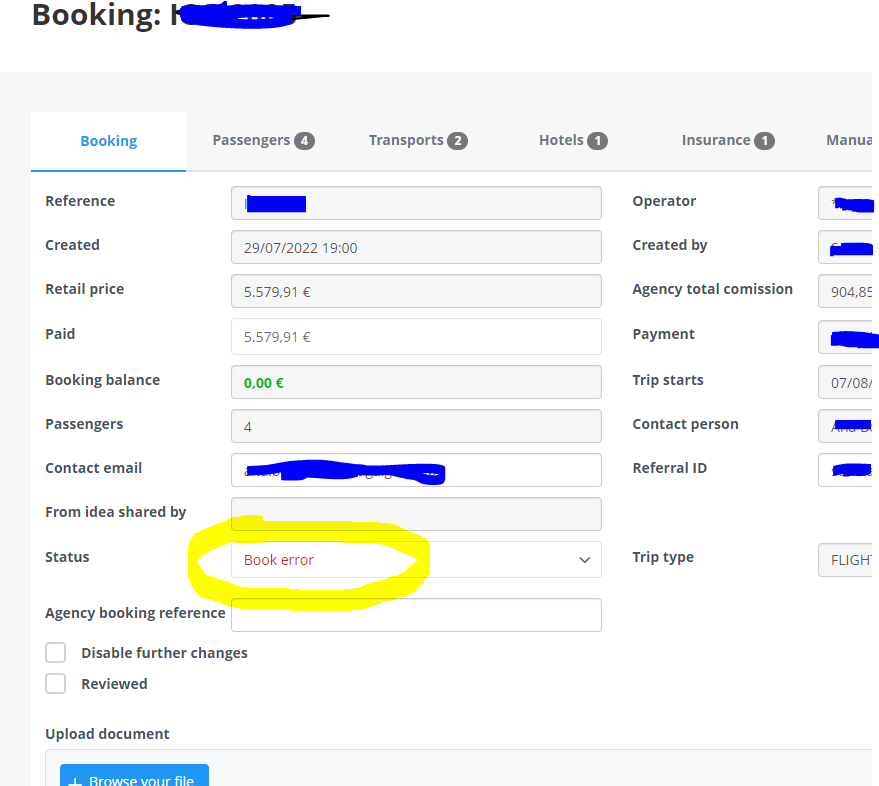
You may algo see other statuses in the general status or the one for each service:
BOOKED: This is the expected status and no action needed, the booking with the provider is fully confirmed.
BOOK ERROR: The provider has replied to our booking confirmation with an unexcepted answer different to the confirmation. Please check the confirmation error columns to view exactly the providers reply. Before attempting to rebook please check in the providers panel or contacting the provider to see if that booking was made.
ON REQUEST: You may see this status in two cases-. 1 For services loaded by you in the back office (contracts) where you have configured it to be sold under request. 2 Some providers may not confirm directly the services and these will enter in this status. Please see the warning column for that service or use the refresh button (if available) to check for status updates of that service. If the status dones not update in a few days please contact the supplier for manual confirmation.
NOT BOOKED: If you see this status in a service it means that the service may not be booked with the provider, this can be caused because you have activated a special configuration for fligh+hotel booking, where if the first service enters in book error the rest of the services will not be booked. Other reasons is insufficient consolidator balance or fraud risk alerts.
Also we could have received a different reply from the provider that the expected confirmation.
Please check in the confirmation error column for more information and always check in providers panel to see if the booking has been finally made.
LOCKED: This status is only applicable to GDS provides. You will see this status when the system has blocked the flights without issuance. You will have to manually issu them in your GDS console.
PRICE ERROR: The booking has been made. The supplier replied to our booking request correctly but when sending the confirmation the booking price did not macht the price agreed. Check the confirmation error cause to check the price difference, it could have increased or decreased. This status is only a warning fr you accounting records.
It is important that you keep updated your booking with the correct statuses, specially when you receive a book error. Failing not to update this will result that Travel Compositor will charge you full the fee if is not in status cancelled.