

• English (UK)
    • Español
  • English (UK)
    • Español
  • Bookings
    • How do I change or cancel a consolidated service in a booking?
    • Can I see my clients purchase attemps?
    • How can I insert remarks in clients booking voucher?
    • I have sufficient consolidator balance but still getting book error "insufficient consolidator balance"
    • I've made a booking, how do I pay the providers?
    • How can I know the navigation language of a booking user?
    • What does the hotel repricing functionality check to show other alternatives?
    • How can I avoid showing status price error in the bookings?
    • Booking error due to payment problems with the providers
    • On request bookings What do I do?
    • My booking is not in status Booked. What do I do?
    • I see a client request of a booking. What is this?
    • In the client request functionality. From where does the client contact us?
    • Where do I receive the clients requests send by the client or agency?
    • In a booking, the provider has cancelled a service. How do I update the status to cancelled?
    • How do I read the cancelation policies of a booked service
    • What is Referral id box that I see in a booking
    • What does navigation language box mean in a booking
    • A booking has been made but the client/agency has not received the confirmation. Why?
    • How does the retry booking work?
  • Holiday packages and Ideas
    • I've loaded a Closed Tour. Do I have to create a Holiday Package with it?
    • Do I have any character restriction in the holiday package or idea title?
    • Can I insert color text in the holiday packages and ideas descriptions?
    • Can I change the font text in the holiday packages and ideas descriptions?
    • Can I share a travel idea or holiday package in a certain language?
    • Can I share a travel idea or holiday package with certain price currency?
  • Home page / Front End
    • How do I upload my cookie policy?
    • How do I add mi companies address to be viewed in my microsite
    • How do I upload my privacy policy?
    • How can I create a destination landing page?
    • How do I change my contact details in the site's footer?
    • How do I upload my terms of use
    • How can I create an hotel landing page?
    • How can I create a link to open a certain search engine?
  • Homepage Search Availability
    • Why a hotel is not showing up in the availability?
    • I can't find a certain room type in accomodation/hotel availability
    • Why that service is not showing with a certain provider?
    • Advance purchase or release days in product availability. How do I configure this?
    • How can I add a remarks during the booking process?
    • No Availability in searches at all or with a certain provider after changing fee configurations
    • I'm not seeing certain airlines with provider Travelfusion
    • Can I set a timeout in availability searches?
    • Why I see Only adults hotels when searching for adults and children?
    • Why I cannot book for more that 1 year in advance?
  • Provider and product management
    • I don't want to sell 1 star category accommodations. How can I ban them?
    • How can I sell only certain accommodations in a destination?
    • How can I prioritize or ban accommodations by country just for a certain provider
    • How can I prioritize an accommodation just with a certain provider?
    • How does the system order activity search results?
    • How can I highlight an accommodation in the availability search?
    • How can I highlight an Activity/ticket in the availability search?
    • I've prioritized or banned my transport and its not working
    • What does the external reference from an idea do?
  • Fees
    • How does the system calculates the booking fees I've configured?
    • I have a provider that will sell me product with my commision margin included. How can I load this in the system?
    • A Provider is selling me commissionable fares. How can I erase or edit this fee?
    • When I have to pay for a booking I see an option to exclude agency commission, how can I remove this option?
    • How can I set up a different agency fee for just one agency?
    • Why do I see an agency management fee in the booking?
    • Custom discount in my operator fee, How can I create?
    • Can I set up a different operator fee per product type, dates, booking type?
    • How do I set a custom fee just for certain services?
    • How do I add a fee for all the contracts of a same supplier?
  • Uploaded contracts
    • How do I add extra services like activities or flights to a closed tour
    • When loading a ticket contract, Can I insert my own type, duration, what's included, excluded and language options?
    • How do I create an access user for a supplier to load is contract in my microsites?
    • How do I restrict a contract to be sold only in a package?
    • How can a restrict a contract service to be offered with a certain advance purchase?
    • I'm seeing twice in the availability the Accommodation I've loaded
    • I've uploaded an hotel in the system and it is not showing
    • I've uploaded ticket or activity in the system and it is not showing
    • I've uploaded a transport in the system and it is not showing
    • I've uploaded a transfer in the system and it is not showing
    • Can I change the font text the contracts descriptions?
    • Can I insert color text in the holiday packages and ideas descriptions?
    • When I sell a contract service, Can I send the booking email to the supplier?
    • Request mandatory passenger phone number, id or bith date of the client when selling a contract service
    • Request mandatory emergency contact of the client when selling a contract service
    • How do I set a warning when a closed tour reaches the minimum passengers to book?
    • how do I set a release day warning for a closed tour I've loaded?
    • When loading an hotel/accommodation. Difference between Rate and season
    • In transfers, What is the difference between Default transfer price and Tranfer prices by occupancy
    • I cannot add transports to my closed tour
  • Others
    • I'm receiving an email with title "Bug improvement". What is this?
    • My Microsite URL is showing non secured. I can I solve this?
    • Which are Travel Compositors fiscal data for invoicing/billing?
    • How can I set up a newsletter authorization parameter
    • How can I get the logs/traces of an availability search?
    • Agency deferred payments days. How do I configure this?
    • My accommodation/hotel provider is sending me package rates, how can I make sure that I'm selling them?
    • System is down or slow. Where can I check the system performance and updates?
    • Why Cant I see the contact/support option in the back office
  • Microsite settings
    • How can I install a web chat?
    • How do I add my domain to my microsite?
    • How do I validate multiple email domains to avoid receiving it as spam or not receiving it?
    • Why do I see the word consolidated in certain providers?
    • I cannot pay the second payment in my deferred booking
    • How can I set a default passenger distribution in the search engines?
    • Why do I see "NO FEES DEFINED" in my providers list?
  • Fraud and security
    • I see a booking in status not booked with Hight fraud risk service. What is this?
    • I'm getting a lot of fraud booking to certain countries. How can I restrict this?
    • I want to restrict users being registered in my microsite from certain countries
    • How can I see the users active in my microsite?
    • What to do during a fraud attack?
    • What do I do to avoid fraud bookings?
  • CMS
    • How can I choose different themes when creating an idea filter banner
  • Booking errors from providers
    • Travelfusion
    • Mystifly
    • Kiwi
    • Aerticket
    • Airtrade
    • Amadeus
    • Consolid
    • Galileo
    • AirGateway
    • Direct Ferries
    • Traffics
    • Sabre
    • Flixbus
    • AIC
    • Alphatours
    • Amadeus hotels
    • American executive
    • Anixe Hotels
    • Booking.com
    • American Tours
    • Anixe
    • Hotelbeds hotels
    • Bookotel
    • Calipso
    • Cupohotel
    • Dingus
    • Destination of the world DOTW
    • Expedia
    • Fastpay
    • Galaxy Vacation
    • Getaroom
    • GRN Connect
    • Go Global
    • Hoteldo
    • Hotelston
    • Civitatis
    • Hotelbeds Tickets
    • Hotelbeds Transfers
    • Carnect
    • Flexible Autos
    • Hotusa
  • Quotes and pricing
    • For flights. Why the system is not quoting RT (round trip fares) that are cheaper than OW'S (one ways)?
    • Can I see the price breakdown per adult and child passenger?

What to do during a fraud attack?

28 views 0

We have created this section to inform you about our security methods against fraudulent attacks or high suspicion of fraud.

In our TravelC system, we have the following indications for prevention:

Agency/User level prevention 

1- Disable user’s access

Users can be restricted so that they can only carry out certain actions from their profile on the ”disable profile permits’‘ screen. To set ups this permits, go to Ideas and Users > users > manage user, as shown in the image:
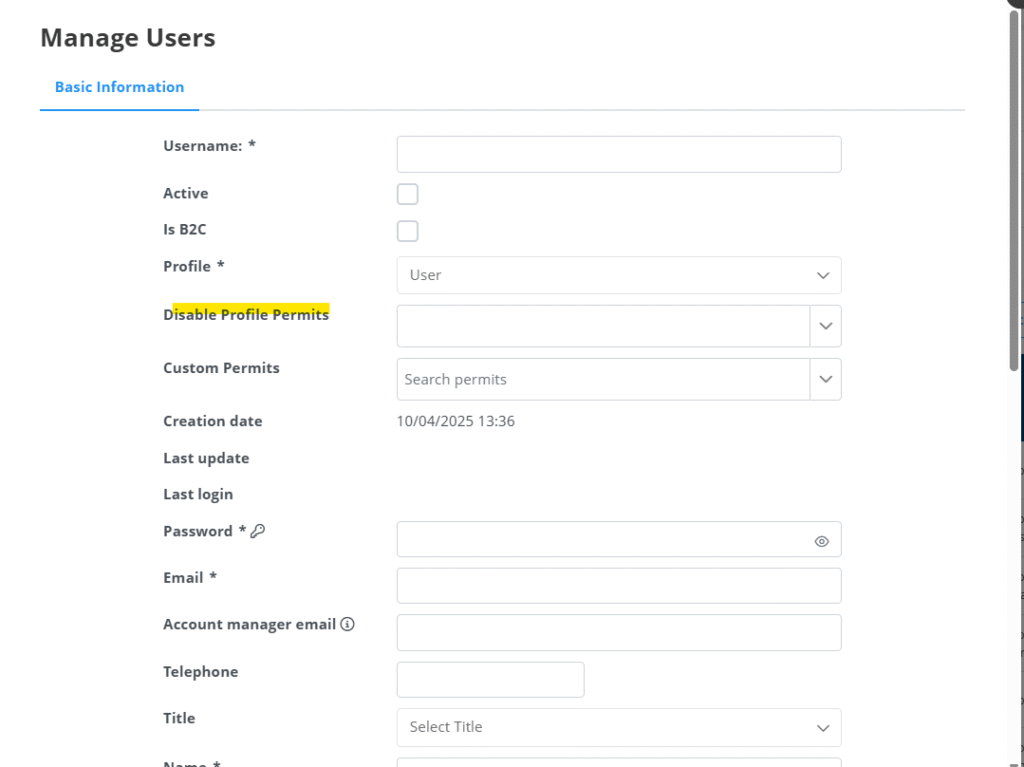
In the drop-down menu look for the permit or type the permit to restrict it to that user.

2- Check users’ change history 

In your ideas and users menu > users > edit user > edit user > Changes history tab, you can see all the changes made by a particular user on a microsite, and record suspicious activity.

3- Create a collective password

At agency level you can set up a ”collective password’‘. In addition to the user’s password, the system will also ask for a collective password for the agency. This tool is only for B2B users. 

To set up this collective password go to your BackOffice > ideas and users > agencies > Domains tab.

Enter the collective password and click on the save button.

4- Security PIN for payment by agency credit/deposit:

For agency credit/deposit payment you can set up a security pin to be requested from the B2B user at the time of payment with such a deposit. 

To do this you must first have the credit/deposit payment check enabled in the Credit/Deposit tab within an agency profile:

Then, we will access the bottom of the page, where you will be able to set up a security PIN: 

The same system recommends for security reasons to set a PIN and to keep a limited credit balance.

5. Activate the two-step validation for payments when booking a trip:

To configure this check go to your Backoffice > microsites > settings > general settings > booking process settings.

Due to the increasing number of hacker attacks, we have developed a tool available to increase the cybersecurity of your users when completing a booking, which we recommend to activate during the weekends, especially when you don’t have a team to take care of the bookings as is often the case on public holidays.

For this reason, you can request that your customers who are going to make a reservation with a deposit payment are asked for a security/validation code that will be sent to the user’s email during the payment process and that they must then enter it in this last step prior to completing the reservation:

This step is also explained in the Front Office manual > Booking flows in all search engines > Payment section.

6. Limit the agency’s credit

In each agency’s profile, in the credit/deposit window, we can see the payment movements, and activate or deactivate the credit/deposit payment allowed.

At the bottom, the total balance and the PIN are displayed.

Our recommendation is to limit the credit of the agencies. You should be the one to choose the limit based on the needs of each agency.

7. Ask passengers their ID as compulsory

You can activate a check so that when  someone is purchasing a trip, all passengers are asked for their identity document.

Find this setting in your backoffice > microsites > microsite settings > microsite settings > passenger data settings.

Microsite level prevention

1- IPS Ranges

To be able to define IPS ranges for accessing a specific microsite. 

Any connection from an IP that is not in that range will be blocked. 

To configure it, go to your back office > microsites > settings > web settings > Allow B2B IPS. For B2B users only.

❗️Contact with your account manager or support to set up this tool. ❗️

2- Check the USERS LOGIN from time to time to see suspicious user logins. 

Access this tab from your back office > ideas and users > user login registry

Based on this information we can go to active users (back office > data > active users) and see what each user has done and quoted.

From here we can also see the ip and the country of login. With all this information we can trace fraud patterns and assess whether or not to deactivate/ban the user. 

To complement this information we can see the payment attempts made by a particular user, to do this we go to the back office > ideas and users > ideas, and in the list that appears, select the filter ”purchase attempt” and if we go to ideas (in ideas and users) we can see the trip that was trying to buy:

You will see information about the time and day of the attempt, who the user is, and from which microsite and agency the attempt was made.

3- Block countries 

On the Countries page (in your back office > microsites > countries) you have the possibility to mark Fraud countries based on 2 criteria (fraud risk and manual registration).

4- Payment gateways: Payment gateways that the operator detects as less secure can be restricted so that only B2B users can use them. 

❗️ Contact your account manager or support to enable or disable payment gateways. ❗️ 

5- Release days 

Most fraud bookings are with imminent departures. On each microsite you can set up a ‘’xx days advance purchase days‘’ where you are not allowed to search for dates that are within those release days. This can be set up for B2B and B2C users.

Go to your backoffice > microsites > settings > search engine > release days

By default the release its two days, but you can set it up according to your preferences.

6- Check the notifications screen from time to time

Find this tab in your back office > operations > notifications

On this screen you will see the real time number of users registering. If an abnormal pattern is detected, such as a large increase in registrations, different countries, emails with strange formats, these are usually indicative of fraudulent users.

7- Limit the number of operator users 

We recommend that you limit the number of users who have the role of operator and keep them under control.

This type of profile greatly compromises the security of the site as they are allowed to do everything. We recommend that you give access to as few users as possible with an operator profile.

WHAT TO DO DURING A FRAUD ATTACK?

1-Massively reset the passwords of all users. 

To configure this tool, go to your backoffice > microsites > configurations > web settings tab.

This is a drastic measure as no user will be able to log in with their passwords. These users will have the possibility to remember their passwords (they will be sent an email with a link to reset them). 

2- Based on the records we see in point 2 above, we can deactivate and ban that user.

3- Be very attentive to point 6 above for a period of time (notifications).

4- Consider temporarily deactivating the payment gateway or gateways that are being used by fraudulent users.

If a suspicious fraudulent booking has nevertheless been entered, try to contact the telephone number and email of the booking to confirm. If you do not receive a response (as usual) you should try to minimise damage by cancelling what you can. 

If you need help setting up any of the above recommendations, contact your account manager or operations:

Customer service hours:

  • Monday to Friday from 8:30h (am) to 02:00h (am) and Saturday from 10:00h (am) to 01:00h (am) (Spain time).
  • Contact phone: +34 971557243 (OPTION 2)
  • Whatsapp: +34 683196600 // +52 9982142684

Was this helpful?

Yes  No
Related Articles
  • I can't find a certain room type in accomodation/hotel availability
  • How do I add mi companies address to be viewed in my microsite
  • How can I install a web chat?
  • How do I upload my cookie policy?
  • How can a restrict a contract service to be offered with a certain advance purchase?
  • Can I see the price breakdown per adult and child passenger?

Didn't find your answer? Contact Us

Previously
How can I see the users active in my microsite?
Up Next
What do I do to avoid fraud bookings?
Copyright 2026 Travel Compositor. All Rights Reserved
English (UK)
Español